
You re-run a check because the number looked wrong, and it comes back different. Same keyword, same tool, twenty minutes apart, two positions of movement. Nothing on the site changed in those twenty minutes, so the movement is either real volatility on that result page or an artefact of how the check was configured. Most trackers will not tell you which, and the client who asks about it on Thursday will not accept “the SERP is dynamic” as an answer twice.
SERP tracking is the practice of recording the whole result page for a query, not just the line your client occupies. The distinction sounds pedantic until the first month a position holds steady and clicks fall anyway. The position did not move. An AI Overview and a local pack moved in above it, and a tracker that stores one integer per keyword has no way to show you that.
Disclosure: I build Rankfinity, a rank tracking tool, so I have a commercial interest in how search visibility gets measured. Nothing below is a claim about my software. Every configuration setting named here exists in the API response or the settings panel of whatever tracker you already pay for, and you can verify each one against your own data before you believe me.
This guide covers the six configuration decisions that determine whether a tracked position survives a client question. It assumes you already run organic position checks for at least one account and have access to either the raw API response or an export that includes more than the rank number.
Key takeaways
- A position is only meaningful next to the configuration that produced it: location, device, language, and the rule used to match the business.
- Local checks belong on exact coordinates rather than a city-level location code, because a city code averages away the variation you are being paid to measure.
- rank_group and rank_absolute answer different questions. Pick one for the report and say in writing which one you picked.
- A featured snippet taking the top slot shifts every organic result down by one in absolute terms while the organic number stays put. That single mechanic is enough to make a correctly configured tracker look broken.
What SERP tracking records that rank tracking does not
A rank tracker answers one question: where is this page for this keyword. A SERP tracker answers a second question at the same time: what else was on the page, and how much of it sat above the result. The second answer is what makes the first one defensible.
Google composes a result page from blocks. Some of those blocks are organic results. Many are not. Every non-organic block that renders above your client’s listing takes vertical space, and vertical space is the thing that converts a position into a click. A report that tracks only the organic integer is reporting a number that can stay flat while the commercial value behind it halves.
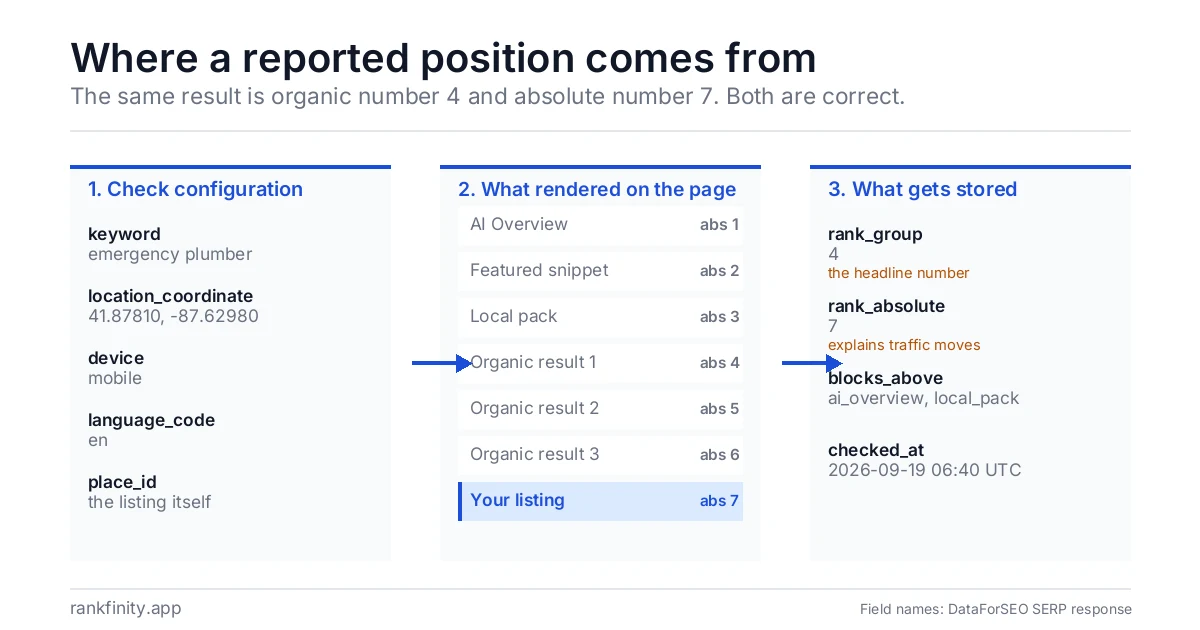
The table below shows how the common blocks behave in the two position fields a SERP API returns. The field names come from the DataForSEO response that feeds this site’s own checks, and both fields are defined there precisely: rank_absolute is “the absolute position among all the elements found in SERP”, while rank_group is the “position within a group of elements with identical type values” (DataForSEO help center, checked 19 September 2026).
| Result page block | Counted by rank_absolute | Counted by rank_group | What it does to your listing |
|---|---|---|---|
| AI Overview | Yes | No, it is a separate element type | Pushes organic results further down the visible page |
| Featured snippet | Yes, it takes absolute position 1 | No, it is a separate element type | Organic results below it sit one place lower in absolute terms |
| Local pack | Yes | No, it is a separate element type | Occupies three listings worth of space above organic |
| Sitelinks under one result | Part of the parent result | Part of the parent result | No change to any other result’s number |
| Standard organic result | Yes | Yes | This is the number most clients believe they are buying |
Read the two middle columns together and the source of most reporting arguments becomes visible. The absolute number moves when the page composition changes. The group number moves when the ranking changes. A client looking at their phone is reading something closer to the absolute number. A consultant looking at a tracker export is usually reading the group number. Both are correct and they disagree.
Where is this page
Where this page sits for this keyword. One integer per keyword.
What else was on the page
What else rendered, and how much of it sat above the result. The second answer makes the first defensible.
The position did not move. An AI Overview and a local pack moved in above it.
Before you configure anything, settle five decisions
Every tracker exposes these five settings somewhere. The defaults are chosen to make setup fast, not to make the output defensible, and three of the five defaults are wrong for local work. Settle them once per account and record the answers, because a setting changed halfway through a retainer destroys the comparability of everything before it.
| Decision | The two common answers | What breaks if you pick the wrong one |
|---|---|---|
| Location granularity | City-level location code, or exact latitude and longitude | A city code returns one blended result for an area where rankings differ street by street |
| Business match rule | Business name string, or Google place ID | A name match attaches the wrong listing when a competitor has a similar name |
| Position metric | rank_absolute, or rank_group | Month-on-month comparison stops meaning anything if the metric changes mid-engagement |
| Device | Desktop, or mobile | Mobile and desktop are separate request parameters and return different page compositions for the same query |
| Check cadence | Daily, or weekly | Daily checks on a volatile query produce movement that looks like work but is noise |
Defaults are chosen to make setup fast, not to make the output defensible. Settle the five once per account and write the answers down.
- Location granularity: coordinates, not a city code
- Business match rule: place ID, not name
- Position metric: one, written down
- Device: desktop or mobile, never mixed
- Check cadence: one schedule per account
Step 1: pin the check to coordinates, not to a city
By the end of this step every local keyword in the account is checked from a fixed point on the map rather than from a region identifier. Most trackers default to a city-level code because it is one field and it always resolves. It is also the reason a client standing in their own shop sees a result your dashboard has never reported.
Set the location using a coordinate pair, which DataForSEO and most other providers expose as location_coordinate, rather than location_code. A coordinate check asks the question a customer asks: what ranks here, at this point, right now. A city code asks a question nobody asks: what ranks somewhere in this metropolitan area. For a service business whose catchment is fifteen minutes wide, those are different businesses.
Use the same coordinate every time, and write it into the account notes. Truncating a coordinate moves the origin: three decimal places of latitude locate a point to within roughly a hundred metres, five decimal places to within about a metre. In a dense trading area that is the distance between two different local packs. If the client has several locations, run a separate set of checks per location rather than averaging them into one number.
Verify the step by running one keyword from two coordinates about two miles apart. If the results are identical, either the query has no local component or the coordinate is not being applied. Both are worth knowing before the first report. This is the same mechanic behind coordinate-level grid checks, where the grid is simply many of these single-point checks laid out across a service area.

Step 2: match the business by place ID, not by name
By the end of this step the tracker is following one specific Google listing rather than any listing whose name resembles the client’s. Name matching fails in a predictable way: it works during setup, when you are looking at the results, and fails silently three months later when a competitor rebrands or the client adds a second location with a near-identical name.
Match on place_id, the stable identifier Google assigns to a business profile. It does not change when the business name changes, and it cannot collide with a similarly named business two suburbs over. If the tracker does not expose a place ID field, that is a real limitation and worth asking the vendor about directly, because the alternative is a report that can quietly start describing somebody else.
Verify by opening the stored identifier against the live listing before the first report goes out, and again after any rebrand or address change. The check takes a minute and it is the only way to be certain the number belongs to the business paying for it.
Works at setup, fails in month three
A competitor rebrands or the client adds a second location with a near-identical name, and the tracker silently follows the wrong listing.
Follows one listing
Does not change when the business name changes and cannot collide with a similarly named business two suburbs over.
Step 3: pick the position metric you are prepared to defend
By the end of this step one metric is chosen, written down, and used consistently in every report for the account. The choice matters less than the consistency, but the choice is not arbitrary.
rank_group counts a result’s position among results of its own type. For an organic listing, that means counting organic listings only, ignoring the snippet and the pack and the overview. rank_absolute counts every block on the page in render order, so a featured snippet occupying the top slot takes absolute position 1 and each organic result below it sits one place lower than its organic number.
Report rank_group as the headline position. It is the number that isolates ranking performance from page composition, which is what an SEO engagement can be held responsible for. Then record rank_absolute alongside it, unreported, so that when clicks move and position does not, the absolute figure shows you the composition change that caused it. Reporting only the absolute number makes an engagement look worse every time Google adds a block, which is not a thing anyone was hired to control.
Google documents the same gap from the other side. Search Console reports position as “the topmost position occupied by a link to your property or page in search results, averaged across all queries” in which the property appeared, and its help page answers the resulting complaint in so many words: “The Performance report says my page position is 5, but when I do a search it’s in position 8! Position value is the average position for all searches. For your specific search your position might be different than the average because of many variables, such as your search history, location, and so on” (Search Console Help, checked 19 September 2026).
So a tracked position, a Search Console average, and what a client sees on their own phone are three different measurements of three different things. A report that does not say which one it contains is inviting the argument. If you have ever had to explain why your figure and another agency’s figure differ for the same keyword in the same month, this distinction is usually most of the explanation, along with location and device. The longer version is in our note on why two rank trackers disagree.
Report rank_group as the headline. Record rank_absolute alongside it, unreported.
Tracked position
One keyword, one place, one device, clean session.
Search Console average
Averaged across all queries in which the property appeared.
The client’s phone
Personalised: search history, location and more.
Step 4: record what sits above the result, not just the number
By the end of this step each stored check carries a list of the blocks that rendered above the client’s listing. This is the field that turns a flat position into an explanation.
Store the element types the response returns for the page: whether an AI Overview rendered, whether a featured snippet was present and who owned it, whether a local pack appeared, how many paid results sat on top. None of this needs to reach the client report. It needs to exist in the stored row so that the month a position holds and traffic drops, the answer is a two-minute lookup rather than a theory.
Featured snippet ownership deserves its own field. A snippet drawn from the client’s own page is worth more than the organic position it replaced. A snippet drawn from a competitor above an unchanged client position is a loss with no movement in the number. Tracking both as “position 3” describes two opposite outcomes identically.
Google describes a featured snippet as a result where “the format of a regular search result is reversed, showing the descriptive snippet first”, and documents two ways to decline one: the nosnippet rule, or a low max-snippet value, with the caveat that “using a low max-snippet setting doesn’t guarantee that Google will stop showing featured snippets for your page” (Google Search Central, checked 19 September 2026). Worth having in your head before a client asks whether the snippet can be switched off, because the answer is yes, and the price is the ordinary snippet along with it.
Generative blocks are the newer version of the same problem and are harder to read, because the citation set behind an AI Overview is not a ranked list in the sense a SERP is. What these surfaces do and do not measure is covered separately in what AI visibility tools measure. The AI visibility module I am building is still in development, so treat that as a direction of travel rather than something I can hand you today.
Worth more than the position it replaced
Record who owns the snippet.
A loss with no movement in the number
Both read as “position 3” if you only store the integer.
- Did an AI Overview render?
- Was a featured snippet present, and who owned it?
- Did a local pack appear?
- How many paid results sat on top?
Step 5: fix the cadence before you fix the dashboard
By the end of this step the account has one check frequency, chosen for the query set rather than for the dashboard’s refresh animation. Daily checking feels diligent. On a query with real volatility it manufactures a line chart that moves constantly and means nothing, and it invites a client to ask about a two-position dip that will reverse on its own by Friday.
Weekly checks on a fixed day and a fixed hour are enough for most local and commercial query sets, and they make month-on-month comparison honest because every data point was collected under comparable conditions. Time of day matters more than most setups assume, because local pack composition and paid coverage both vary across the day.
Whatever cadence you choose, never compare a number collected on one schedule with a number collected on another. If you switch from daily to weekly mid-engagement, draw a line on the chart at the switch date and say so in the report. A visible discontinuity you explained is a trust signal. An invisible one that a client discovers is the end of the relationship.
Every point checked from its own coordinates
Rankfinity runs each grid point as a separate coordinate search and matches your listing by place ID, so the stored number has its settings attached.
Step 6: store the configuration next to the number
By the end of this step every stored position carries the settings that produced it, so any figure in any report can be reconstructed months later without asking a vendor. This is the step that separates a tracker from a spreadsheet of integers.
The row below is the minimum. Each field exists because a client has asked the question in the right-hand column, and because answering it from memory is how consultants lose arguments they were winning on the facts.
| Stored field | Example value | The client question it answers |
|---|---|---|
| keyword | emergency plumber | What exactly did you search for? |
| location_coordinate | 41.878100, -87.629800 | Where was the search made from? |
| device | mobile | I checked on my phone and saw something else |
| language_code | en | Why does my cousin see a different page? |
| place_id | the listing’s own Google identifier | Is that our listing or the one with the similar name? |
| rank_group | 4 | What position are we in? |
| rank_absolute | 7 | Why does my phone show something different? |
| blocks_above | ai_overview, local_pack | Why did traffic fall when the position held? |
| checked_at | 2026-09-19 06:40 UTC | Is this from before or after the change we made? |
Nine fields per check is not a heavy storage cost, and it changes what a monthly report can say. A report built on rows like this can state a position, show the composition that surrounded it, and answer the follow-up in the same document. That is the difference between a dashboard and a report a client can audit.
Where these setups go wrong
Four failure modes are worth naming. All four are configuration rather than software quality, which means all four are yours to fix.
The first is changing a setting mid-engagement without recording it. Someone switches the device to mobile in month four because local queries are mobile-heavy, which is the right call, and the chart shows a drop that gets attributed to the work. The fix is a change log with dates, kept next to the account.
The second is averaging positions across keywords into a single figure. An average position across a keyword set with wildly different volumes is a number that cannot go anywhere useful, and Search Console computes its own average differently again, so the two will never reconcile. Report a distribution or a defined subset, not a mean.
The third is tracking the client alone. A position of 4 is a different situation depending on who holds 1 through 3 and whether they have held it for a year. Pulling the same checks for the two or three businesses competing for the same query turns a position into a view of share of voice, which is a conversation a client can act on.
The fourth is trusting a number nobody can reproduce. If the stored row does not contain the location, the device, and the match rule, the number is an assertion. It may well be correct. It is not evidence, and the first time it is challenged you will find that out.
A setting changed mid-engagement
Fix: a change log with dates, kept next to the account.
Positions averaged across keywords
Fix: report a distribution or a defined subset, not a mean.
Tracking the client alone
Fix: pull the same checks for the two or three businesses competing for the query.
A number nobody can reproduce
Fix: store location, device and match rule in every row.
Check your tracker in one sitting
- Is the location a coordinate pair?
- Is the listing matched by place ID?
- Is one position metric chosen and written down?
- Is the device recorded on every check?
- Is there one cadence, with a visible line where it changed?
- Are the blocks above the result stored?
- Does every stored row carry the settings that produced it?
Common questions
Is SERP tracking the same as rank tracking?
They overlap but they are not the same scope. Rank tracking records where a page or listing sits for a keyword. SERP tracking records the composition of the whole result page alongside that position, including the blocks that pushed the listing down without changing its ranking. Every SERP tracker does rank tracking. Not every rank tracker stores enough of the page to explain its own output.
Why does my tracker disagree with what I see in my own browser?
Almost always because the two checks were not asking the same question. Your browser carries a location, a login, a search history, and a device profile. A tracker runs a clean check from a configured location with no personalisation. Add the rank_group and rank_absolute distinction on top and a two or three position gap is the expected result rather than a defect. Google’s own Search Console documentation, quoted earlier, says as much. Check the configuration on both sides before you raise it with a vendor.
Should a client report show rank_group or rank_absolute?
Show rank_group and store rank_absolute. The group number isolates ranking from page composition, so it reflects the work the engagement is responsible for. The absolute number explains traffic changes that happen without any ranking movement, which is a question you will be asked rather than a metric you volunteer. Reporting both without labelling which is which is the worst of the three options.
How often should positions be checked?
Weekly, on a fixed day and hour, suits most local and commercial query sets. Daily checking is defensible for a small set of high-volatility head terms during an active campaign, and hard to justify otherwise, because the extra resolution mostly surfaces movement that reverses on its own. The cost of daily checking is not the credits. It is the client questions about noise.
Do AI Overviews need separate tracking?
They need to be recorded as a page block in every SERP check, because their presence changes how far down the visible page an organic result sits. Whether they need a separate measurement programme depends on whether the client’s buyers are asking assistants rather than searching, which is a different question with a different method. There is a longer treatment of that in our guide to checking whether assistants recommend a business.
What to do with this before your next report
Take one keyword a client has questioned in the last three months and try to fill in the nine fields from the table above for the specific check that produced the number you gave them. If the location, the match rule, and the metric are all recoverable, the report was defensible and you can move on. If any of the three is missing, the number was an assertion and the next challenge will land.
If the missing field is location, and the account is a local business with a service area rather than a single storefront, the fix is a set of coordinate checks laid out across the area rather than one check at the centre. The geo-grid rank tracking page shows how those checks are arranged and what the output looks like when the grid disagrees with itself.